POS for Supermarkets & Minimarts

POS built for busy supermarket and minimart counters

Kenyan minimarts and supermarkets lose margin to slow queues, uncounted stock and messy end-of-day M-Pesa matching. Zeni POS gives you barcode-first checkout, live stock visibility and shift reports your cashiers can close without a spreadsheet war.

Challenges supermarkets & minimarts face

  • Long queues when barcode search and cart edits are slow
  • Stock counts that never match the shelf after a busy weekend
  • Cashiers reconciling M-Pesa SMS against the drawer by hand
  • No clear till-by-till accountability when cash is short
  • Growing from one till to three without changing systems mid-season

What Zeni POS gives you

  • Barcode-first Point of Sale with product grid fallback
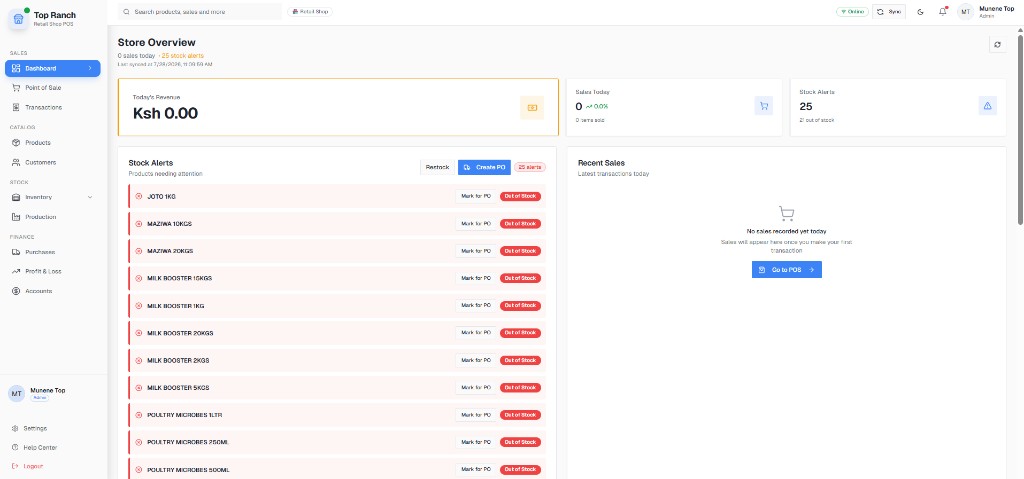
  • Low-stock alerts on the store dashboard
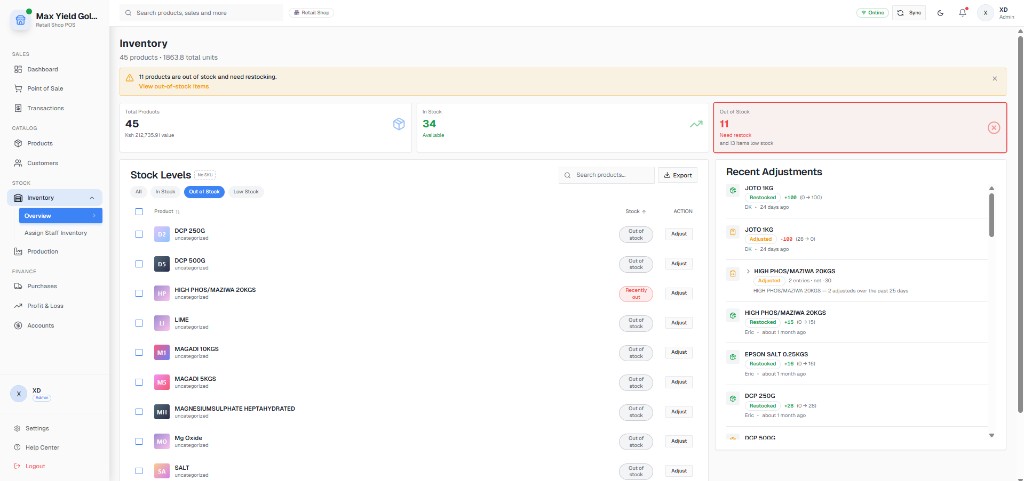
  • Inventory counts with in-stock / out-of-stock visibility
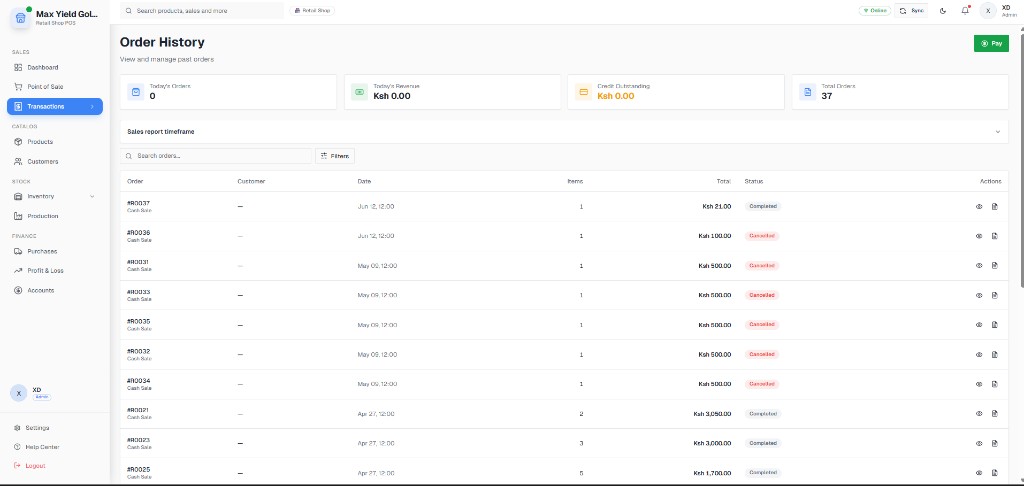
  • Transaction history by order, cashier and payment method
  • Profit & Loss so owners see margin, not only turnover
  • Offline selling when fibre or Safaricom data drops

Day-to-day workflows

Concrete steps your team can follow from open to close — not generic feature lists.

Step 1

Morning open to first sale

Get the till ready before customers arrive.

  1. Sign in with a cashier role (no access to wholesale cost edits).
  2. Check dashboard stock alerts for items that sold out yesterday.
  3. Open Point of Sale, scan barcodes, accept cash or M-Pesa STK push.
  4. Print or share the receipt and move to the next customer.
Step 2

Mid-day stock and receiving

Keep shelves accurate while the shop stays open.

  1. Receive supplier deliveries into Inventory before items hit the floor.
  2. Update product prices only from an authorized manager account.
  3. Run a quick cycle count on high-value SKUs (cooking oil, sugar, detergents).
  4. Transfer or adjust stock with a logged reason — not a silent edit.

Step 3

Shift close and owner review

Finish the day with numbers you can trust.

  1. Pull Transactions for the shift and filter by till / cashier.
  2. Match cash + M-Pesa totals against the drawer and Daraja settlements.
  3. Review Profit & Loss for the day: revenue, cost of goods, expenses, net.
  4. Owner checks the dashboard from a phone before locking up.

Real product screenshots

Captures from live Kenyan businesses running Zeni POS — Dashboard, Point of Sale, Products, Inventory, Transactions and Profit & Loss.

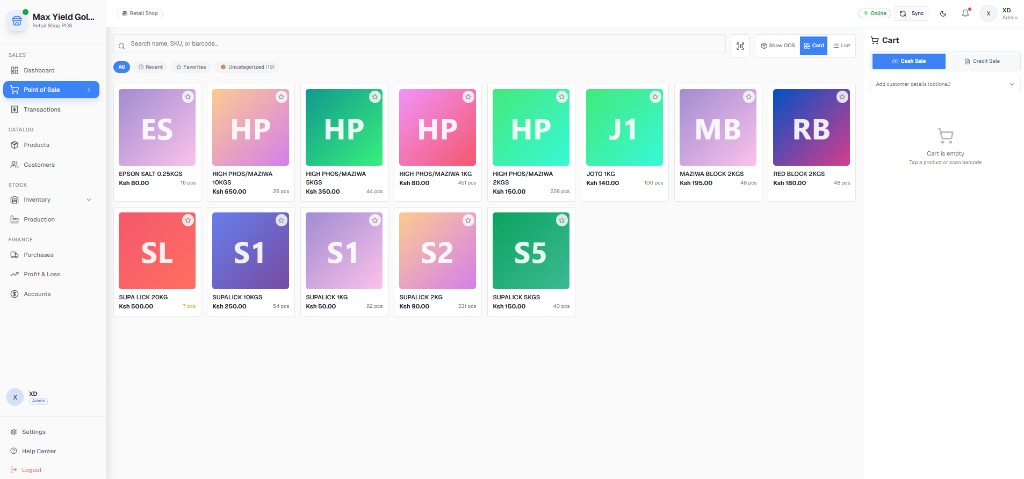
Supermarkets & Minimarts: Barcode & product-grid checkout

Barcode & product-grid checkout

Live Point of Sale used by Max Yield Gold LTD — the same checkout flow minimarts use for fast barcode sales.

Supermarkets & Minimarts: Dashboard with stock alerts

Dashboard with stock alerts

Top Ranch dashboard showing sales overview and stock alerts — what a supermarket owner checks before restocking.

Supermarkets & Minimarts: Inventory status board

Inventory status board

In-stock vs out-of-stock visibility so dukas stop selling phantom stock.

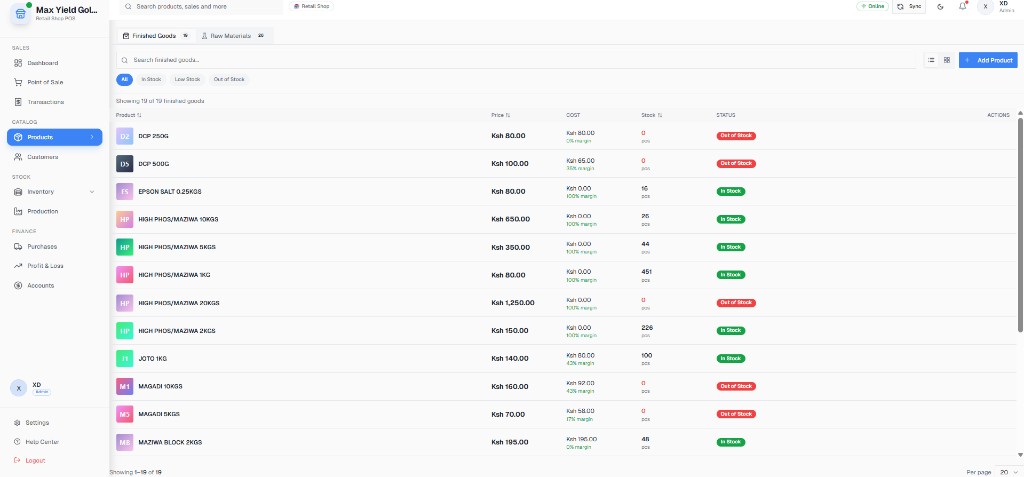
Supermarkets & Minimarts: Catalog with price & margin

Catalog with price & margin

Product list with pricing, cost and margin — critical when supermarket markups differ by category.

Supermarkets & Minimarts: Shift transaction history

Shift transaction history

Order history with status and totals for cashier accountability at closeout.

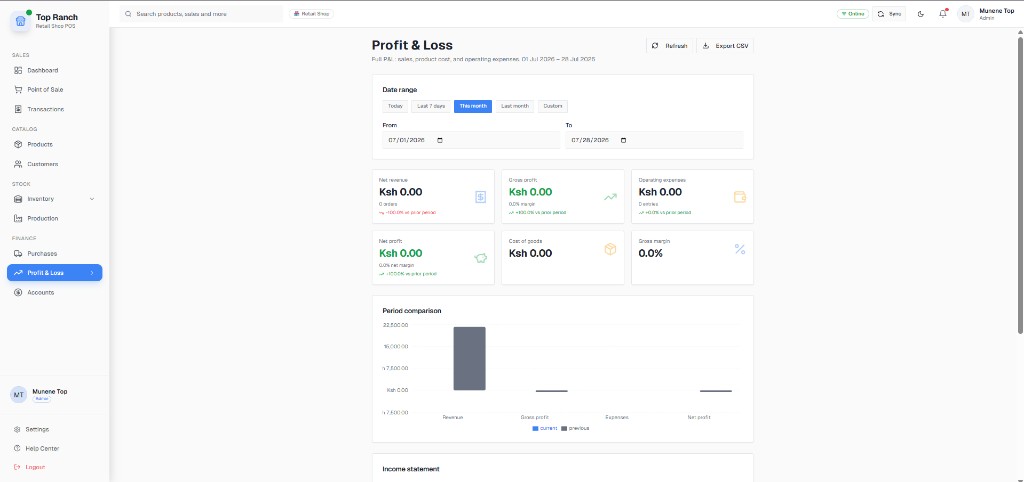
Supermarkets & Minimarts: Profit & Loss for owners

Profit & Loss for owners

Revenue, gross profit, expenses and net profit from a live Kenyan retail shop.

  • - Real screenshots from Max Yield Gold LTD and Top Ranch — retail shops already running these modules daily.
  • - Evidence covers Dashboard, POS, Products, Inventory, Transactions and Profit & Loss — not marketing mockups.
  • - Read the full write-ups on the Case Studies pages linked below.
Full case study: Max Yield Gold LTD

Example pricing shapes

Illustrative Kenya-shilling quote shapes used in demos. Your final figure depends on tills, branches and onboarding — always confirmed in writing before you pay. No hidden per-transaction fees.

Single-till minimart

1 counter, 1–3 cashiers sharing a shift

From KES 3,500 / month

Typical setup: product import + barcode printer check + 1 training session (quoted in writing).

  • - 1 till / device
  • - Unlimited products
  • - M-Pesa Daraja setup
  • - Inventory + P&L
  • - WhatsApp support

Busy multi-till supermarket

2–4 tills, weekend peak queues

From KES 7,500 / month

Quote scales with tills and branches. Hardware (scanner/printer) billed separately if you need it.

  • - Multi-till reporting
  • - Cashier roles
  • - Stock alerts
  • - Shift reconciliation views
  • - Onboarding for your team

Growing mini-chain

2+ branches that need one owner view

Custom branch quote

We price per branch + shared owner dashboard. Ask for a written Kenya-shilling proposal after a free demo.

  • - Multi-branch visibility
  • - Stock transfer workflows
  • - Central product catalog
  • - Owner P&L rollup
  • - Local onboarding
Request your written quote

Outcomes owners care about

  • Result: Faster average basket time once barcodes and cart flow are dialled in
  • Result: Fewer “sold but missing” surprises after weekend rushes
  • Result: Cleaner M-Pesa + cash closeouts without SMS archaeology
  • Result: Owner visibility of margin, not only day’s sales total

FAQs for supermarkets & minimarts

Does Zeni POS support barcode scanners for supermarket checkout?

Yes. Cashiers scan into Point of Sale on Android, tablet or browser. If you already own a USB or Bluetooth scanner, we help you connect it during setup.

Can I run more than one till in the same supermarket?

Yes. Multi-till setups are supported with cashier roles and reporting so you can see sales by till and by staff member.

How does supermarket pricing work with Zeni POS?

We quote in Kenya shillings based on tills and branches. Example shapes start from about KES 3,500/month for a single till; multi-till and multi-branch are custom. You always get a written quote before you pay.

Does supermarket POS include KRA eTIMS invoices?

Yes. Zeni POS supports electronic tax invoices through DigiTax, a KRA-licensed OSCU integrator, so barcode sales can become fiscal invoices your business customers can use — without a second tax app at the till.

See Zeni POS running in your shop

Book a free 20-minute demo and we will walk you through selling, M-Pesa and stock using your own products. No obligation, no card needed.

Placeholder contact details — swap in the real WhatsApp line and demo booking link.