POS for Pharmacies

Pharmacy POS with stock discipline and clear accountability

Pharmacies mix high-value SKUs, sensitive stock and walk-in urgency. Zeni POS helps your team sell quickly, keep inventory honest and give the owner a Profit & Loss view that separates busy days from profitable days.

Challenges pharmacies face

  • Expiry risk on slow movers eating cash on the shelf
  • Staff adjusting stock or prices without a clear audit trail
  • Prescription or counter notes lost between paper and WhatsApp
  • End-of-day cash and M-Pesa totals that never quite match
  • No quick way to see which products drive margin vs volume

What Zeni POS gives you

  • Fast Point of Sale for counter and OTC sales
  • Inventory with clear in-stock / out-of-stock status
  • Product catalog with cost, price and margin visibility
  • Role-based access so cashiers cannot edit wholesale costs
  • Transaction history for dispute resolution
  • Dashboard alerts when stock runs low

Day-to-day workflows

Concrete steps your team can follow from open to close — not generic feature lists.

Step 1

Dispense / sell at the counter

Serve patients and walk-ins without losing stock accuracy.

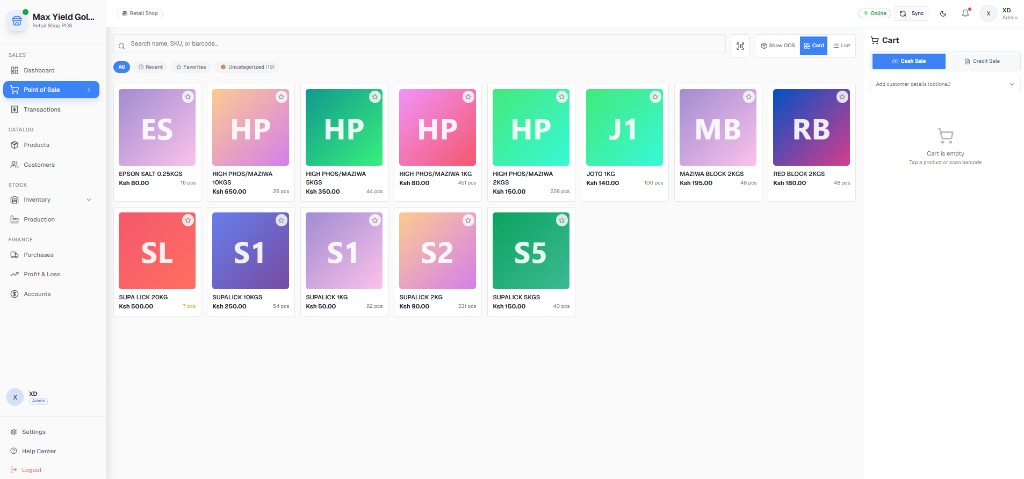
  1. Cashier opens Point of Sale and searches by product name or barcode.
  2. Add OTC items to the cart; note prescription references in your internal process.
  3. Accept M-Pesa or cash and issue a receipt.
  4. Stock decrements automatically so the next shift sees truth, not a guess.
Step 2

Receiving and expiry-aware restock

Protect capital tied in pharmacy inventory.

  1. Receive supplier invoices into Inventory before shelving.
  2. Prioritize near-expiry lots in your internal FEFO habit; use stock status to act early.
  3. Manager-only accounts adjust prices or write-offs.
  4. Review Products for margin on high movers (analgesics, antibiotics, baby care).

Step 3

Owner evening review

Know what sold and what still sits.

  1. Open Dashboard for today’s sales and stock alerts.
  2. Scan Transactions for voids or unusual discounts.
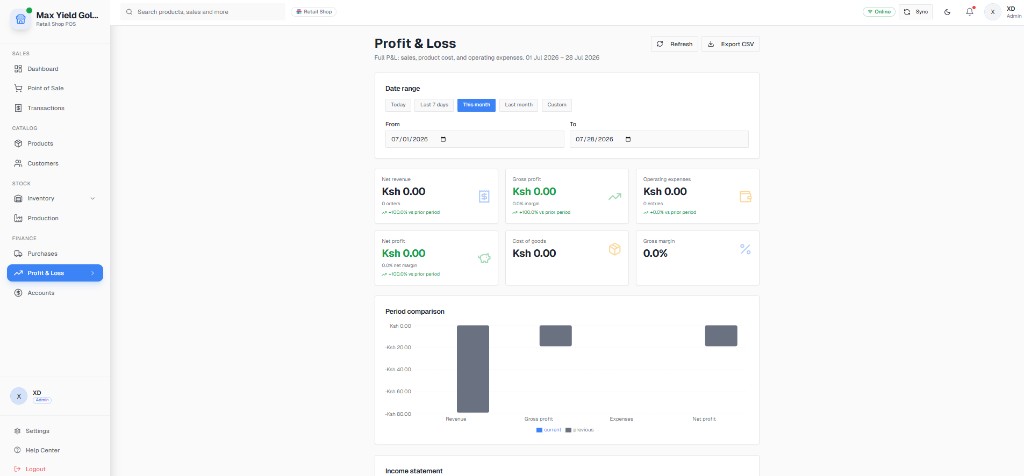
  3. Check Profit & Loss: revenue vs cost of goods vs expenses.
  4. Plan tomorrow’s purchase order from out-of-stock items.

Real product screenshots

Captures from live Kenyan businesses running Zeni POS — Dashboard, Point of Sale, Products, Inventory, Transactions and Profit & Loss.

Pharmacies: Counter checkout

Counter checkout

POS product grid and cart — the same module pharmacies use for OTC and counter sales.

Pharmacies: Inventory control

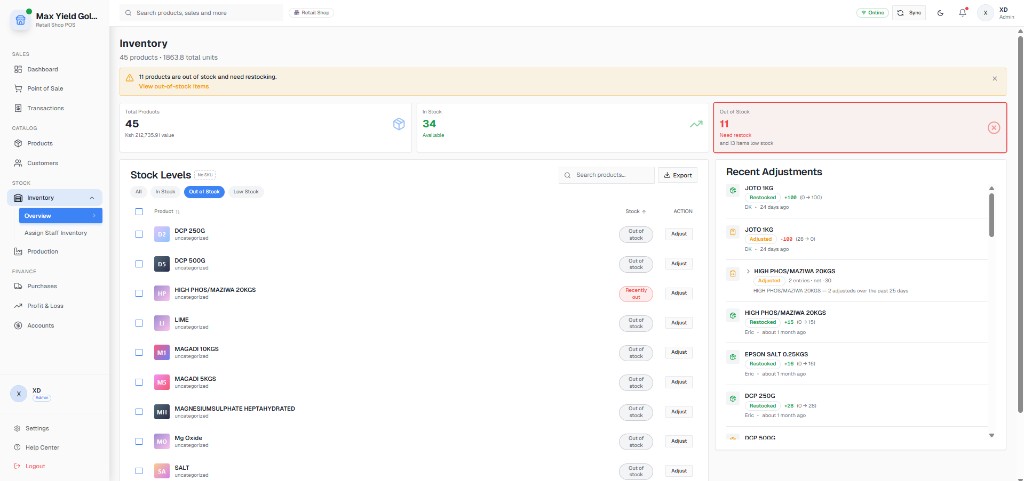
Inventory control

45 products tracked with in-stock and out-of-stock counts in a live customer snapshot.

Pharmacies: Price, cost and margin

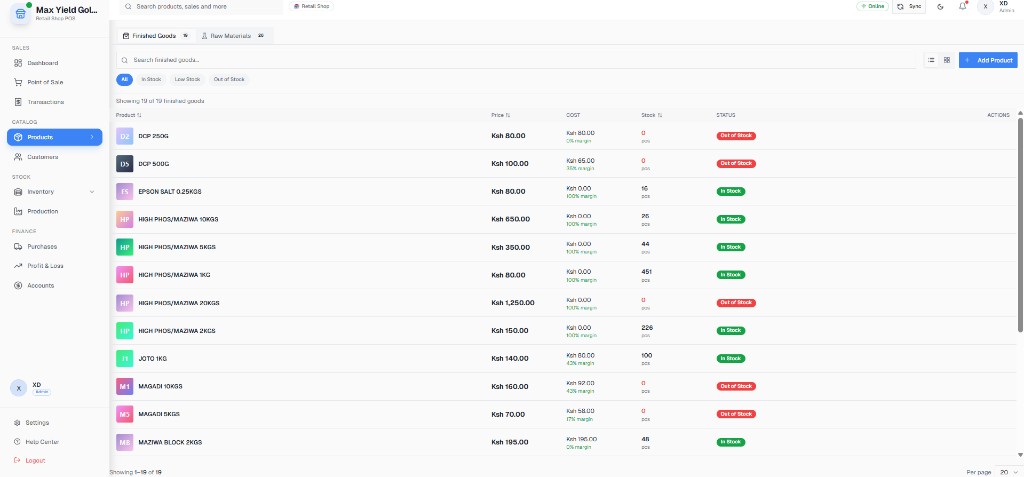
Price, cost and margin

Per-item pricing and margin visibility for pharmacy catalogs.

Pharmacies: Owner dashboard

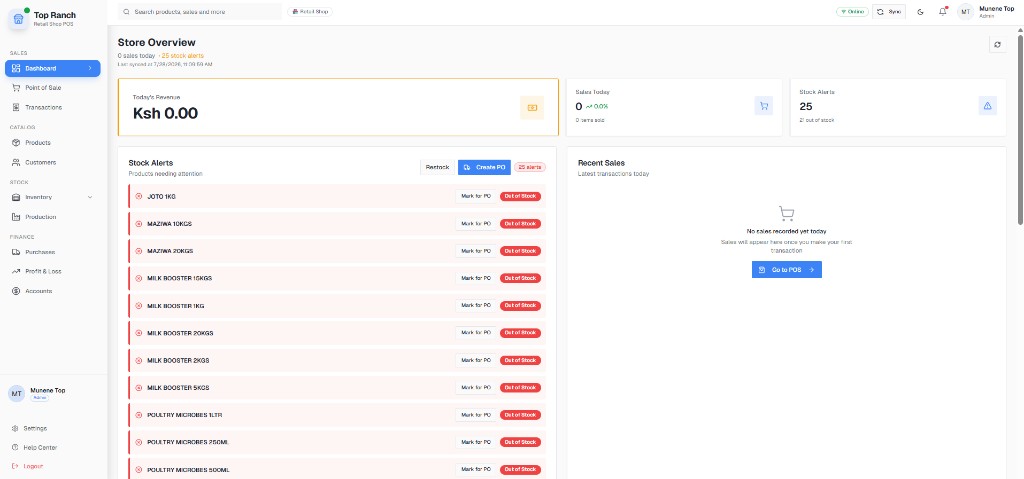
Owner dashboard

Sales overview plus stock alerts for morning purchasing decisions.

Pharmacies: Sale history

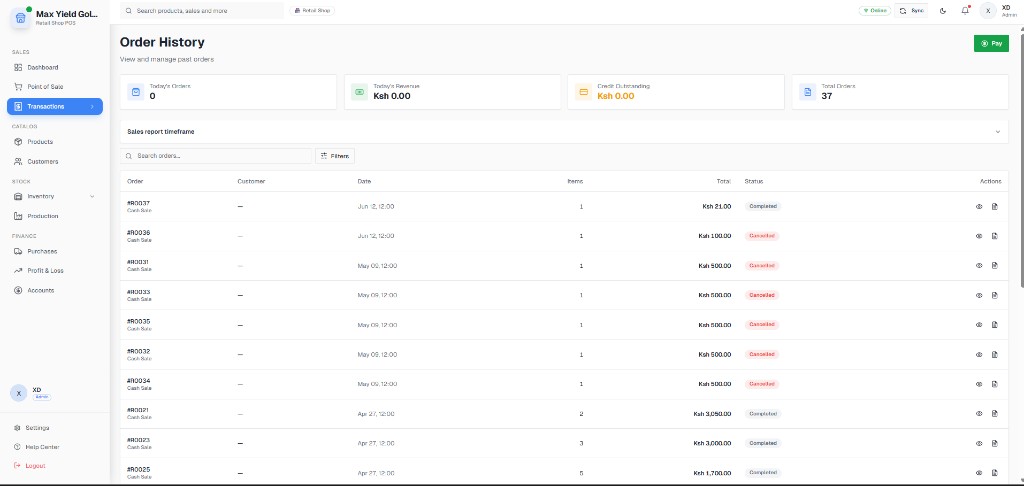
Sale history

Transaction list for reconciling disputed sales or insurance follow-ups.

Pharmacies: Pharmacy P&L view

Pharmacy P&L view

Gross profit and net profit reporting used by live Kenyan retailers.

  • - Screenshots are from production retail customers (Max Yield Gold LTD, Top Ranch), showing the exact modules pharmacies rely on daily.
  • - Inventory and Products modules demonstrate stock status and margin fields used for controlled catalogs.
Full case study: Max Yield Gold LTD

Example pricing shapes

Illustrative Kenya-shilling quote shapes used in demos. Your final figure depends on tills, branches and onboarding — always confirmed in writing before you pay. No hidden per-transaction fees.

Neighbourhood pharmacy

1 till, pharmacist + 1–2 assistants

From KES 3,500 / month

Includes product import help and role setup so only managers edit costs.

  • - 1 till
  • - Inventory + products
  • - M-Pesa integration
  • - P&L reporting
  • - Staff roles

Busy chemist with queue

Peak hour traffic, 2 devices

From KES 6,500 / month

Second till priced into the quote; confirm scanners/printers separately.

  • - Multi-user checkout
  • - Stock alerts
  • - Shift history
  • - Training call or visit
  • - Ongoing support

Pharmacy group

2+ outlets under one owner

Custom per branch

Branch quotes shared after a WhatsApp demo of your SKU count and outlets.

  • - Branch visibility
  • - Central catalog option
  • - Owner reporting
  • - Staged rollout
  • - Written KES quote
Request your written quote

Outcomes owners care about

  • Result: Fewer silent stock edits at the counter
  • Result: Clearer purchasing from out-of-stock and low-stock signals
  • Result: Faster closeouts with M-Pesa matched to sales
  • Result: Margin visibility on the products that actually pay the rent

FAQs for pharmacies

Can Zeni POS help with pharmacy expiry management?

Zeni POS supports expiry-aware inventory habits with stock visibility and role controls. Your team still follows FEFO on the shelf; the system makes status and movement visible so near-expiry stock is acted on earlier.

Who can change prices or write off pharmacy stock?

Role-based access lets cashiers sell while managers control pricing, voids and stock adjustments — reducing silent margin leaks.

What does pharmacy POS pricing look like in Kenya?

Example single-till quotes often start around KES 3,500/month including software, M-Pesa setup and core inventory modules. Exact pricing depends on tills and branches — always confirmed in writing.

Can a chemist issue KRA eTIMS invoices from Zeni POS?

Yes. Fiscal tax invoices go through DigiTax, a KRA-licensed OSCU integrator, so clinic and walk-in sales can become electronic invoices without a separate tax portal.

See Zeni POS running in your shop

Book a free 20-minute demo and we will walk you through selling, M-Pesa and stock using your own products. No obligation, no card needed.

Placeholder contact details — swap in the real WhatsApp line and demo booking link.